


It can only answer from what you were already allowed to open.
Most AI assistants inherit whatever access a user technically has, which quietly turns years of over-shared folders into search results. OfficeSage checks permissions on every single question.
Checked per person, per question — and it fails closed
Checked per person, per question
Before retrieving anything, OfficeSage resolves that user's current group memberships — including nested groups — and searches only the documents those groups can open.
It fails closed, not open
If permissions cannot be confirmed for any reason, the assistant returns no documents at all rather than falling back to everything. The safe failure is the boring one.
| When someone asks a question | What OfficeSage does | What it never does |
|---|---|---|
| Identity | Signs them in with your existing Microsoft account and reads their live group memberships. | Keep a separate password, or trust an identity the browser supplied. |
| Retrieval | Searches only documents those groups may open, filtered before the AI ever sees them. | Search the whole index and filter the answer afterwards. |
| Answering | Answers drawn from your documents list their sources. | Present an unsourced summary as fact. |
| Afterwards | Records the interaction for the administrator's usage reporting and audit trail. | Use your content to train a model, or share it with another customer. |
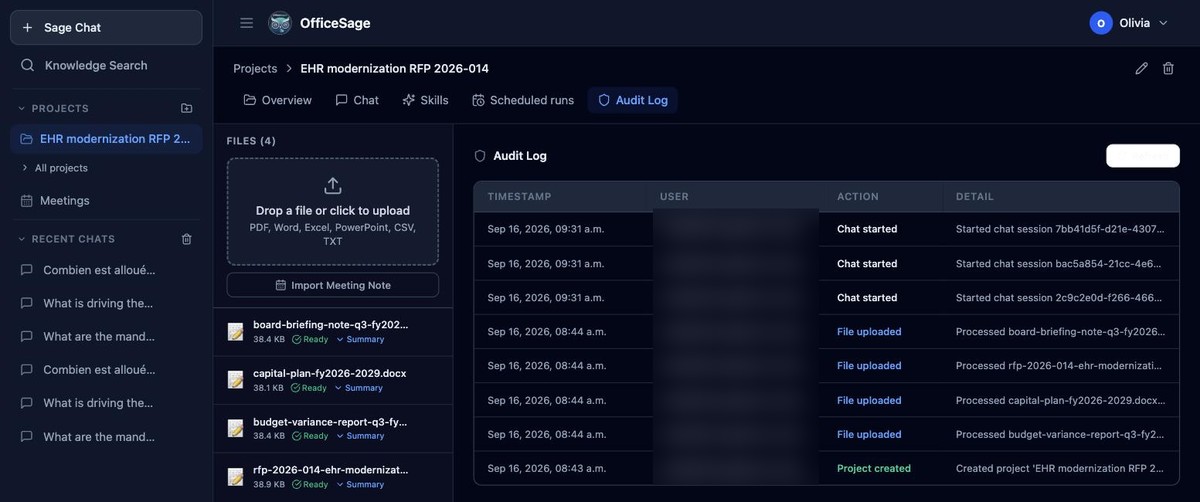
A real audit trailEvery project keeps its own log of who did what and when — not a promise, a screen your IT lead can open.
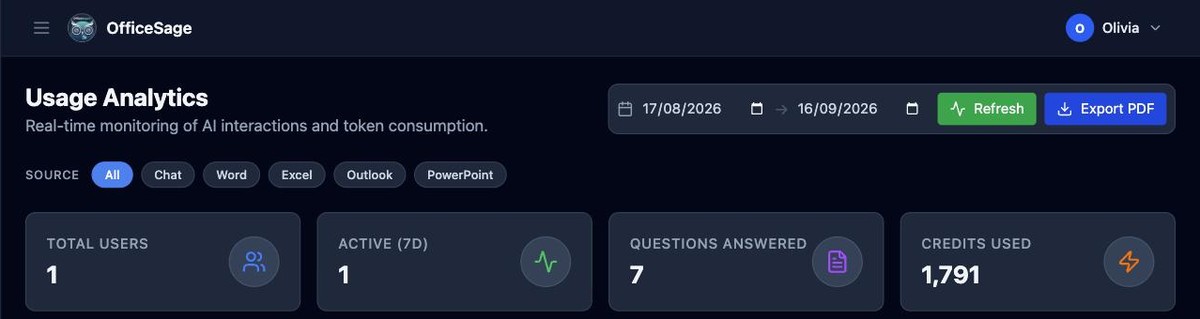
Administrator visibilityUsage by department, exportable as PDF.
The answers your security review is going to ask for.
No gated PDF, no "contact us for details". Here is the posture in full, so your compliance officer can assess us before you spend a meeting on it.
- Deployment model
- Dedicated deploymentsDedicated deployments available. Each organization's data is isolated by tenant.
- Hosting region
- Montréal, CanadaYour OfficeSage workspace (document index, chat history, summaries and analytics) is hosted in Montréal.
- Model hosting
- Customer choice — Canadian or EuropeanWhere inference happens follows the model you select; Canadian-hosted and EU-hosted options are both available.
- Training on your data
- NeverYour content is used only to answer your own users' questions. It is not used to train or improve any model.
- Encryption
- TLS 1.2+ and at restEncrypted in transit (TLS 1.2+) and at rest.
- Sign-in
- Microsoft Entra ID single sign-onNo separate passwords.
- Deletion
- Immediate removalDeleting a conversation removes it from chat history immediately.
- Audit logging
- Recorded in an audit logPrompt activity and project changes are recorded in an audit log.
- Microsoft permissions
- Scoped, documented, admin-consentedWe provide the full list of Microsoft Graph permissions, and what each is used for, during your security review.
- Languages
- English · FrenchAsk in English or French and get answers in the same language. Meeting summaries in English, French, or both.
- Connected systems
- Early accessAdded by an administrator; usable only in projects whose skills name them; calls recorded.
Working through a formal vendor assessment? Send us your questionnaire at admin@copoly.ai and we will complete it — we would rather answer it now than at the end of the process.
Posture last reviewed 15 September 2026.
Pick the AI that suits the work — and the jurisdiction.
Choose the AI model for each conversation, including models that run in Canada. Your deployment sets the default, and a user can switch per question — a sensitive file handled by a Canadian-hosted model, everyday drafting by whichever model suits it best.
Augure
Ossington 4 · Ossington 5 (Reasoning) · Rosedale 1 (Long context) · Tofino 3 (Fast)
SPUR, Ontario
Mistral Small 24B
Google Cloud, Montréal
Gemini 2.5 Flash (fast) · Gemini 2.5 Pro
Hosted in France
Mistral Small 3 · Llama 3.3 70B
Your deployment's model menu is set to the models your organization approves, and you can set a different model for meeting summaries than for chat. Available models are configured for each organization, to match its security requirements. More models can be added on request.